Welcome to Everlast Software, LLC - Document Imaging, Imaging, and Image Printer Driver Tools Downloads Products Services Contact Us FAQ About

ES Image Printer Driver (Version 1.3.4)
 

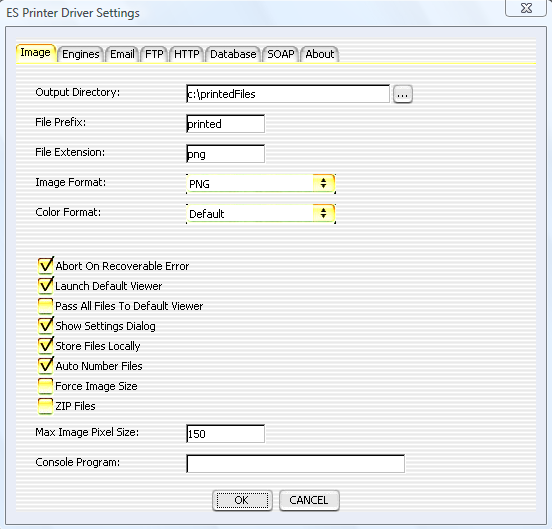
ES Image Printer Driver is a software printer driver that is accessible from any program that can utilize a Windows or Mac OS X CUPS printer. Images are produced from the driver and stored on a specified drive and location with incremental numbers.  The Windows driver is capable of printing 24-bit color images, as well as 1-bit black and white (binary) at 100, 200, 300, and 600 DPI either portrait or landscape. The Mac OS X version always prints in color mode (non PDF images are approximately 200 DPI). It is flexible and supports several image file formats such as PNG, BMP, JPEG, TIFF, Multi-Page TIFF, PNM, JPEG 2000, GIF, Animated GIF, and PDF. In addition to capturing print jobs, the Windows driver also has an optional clipboard monitoring tool that can intercept copying an image to the clipboard. The user is then presented with a dialog to choose whether to treat the image as a print or ignore it. Common uses for the driver are in conjunction with document imaging systems, testing environments, help with troubleshooting, screenshot capture sharing, etc. The driver also contains an engine that can allow a user to import images, as though they had been printed, from a directory using a navigation dialog.

Windows Video Demonstration (WMV)

Detailed Feature List

The Mac OS X version of the driver can produce PDF files that contain actual text (if text documents are printed). This means the PDF's can be searched and edited with a PDF Viewer that supports those functions.

The Windows 2000, XP, XP x64, and 2003+ version can produce text files in addition to the image files. The text files are named the same as the produced images with '.txt' appended on the end. These text files can then be used to search the contents of the original printed document by other applications, developers, etc. The text files can even be parsed for keywords or unique identifiers in order to automatically choose a Printer Driver Engine configuration.

Order the ES Image Printer Driver


It also supports sending an email to anyone via SMTP. The images printed are added as attachments to the email, and users may type in a full text message for the body of the email. This is accomplished by displaying a graphical user interface at print time, which is optional. This interface can be suppressed to now be displayed at each print.


FTP sending is also an option with the driver. The images that are produced can automatically be uploaded to a FTP server on any TCP/IP network (Intranet, Internet, etc).


The driver also supports saving the files into a database via JDBC or ODBC or uploading them to a webserver via HTTP or HTTPS. It even has the ability to send SOAP messages to web services.

The driver is driven by XML files that can be administered and changed for use in business environments or for mass printing and/or control. They can even be configured to download XML from a remote server.


USES


BUSINESSES
All of these options make the printer driver an excellent tool for bug reporting, problem tracking, etc., for businesses wanting to maximize their business time.

All businesses (small, medium, and large) deal with and rely on many other computer programs in order to maximize their employees' time. They often utilize both, 3rd party software, and in-house software, developed specifically for their needs. Almost all businesses have had the experience of finding show-stopping bugs in various programs which prevent them from getting their job done. Often time, businesses have an entire department committed to helping the users either find solutions for the software, ways to fix the software, or submit incident reports to the developers of the software. This is a very time consuming task, not only for the computer support department, but also the employees that use the software who must communicate the problems to the support department in a clear manner so that the real problem can be understood. This is where the ES Image Printer Driver can be of great aid and save businesses thousands, if not millions, of dollars a year.

A picture can speak a thousand words, and that is exactly what the driver does. With the simple print of any document, image, screenshot, etc., instead of the results going to a laser printer, images are produced which can be instantly emailed to a support person, transferred to an FTP server, or simply saved to the local computer's storage with one simple click. All of this can happen in the background too, without requiring user interaction, thus saving MORE time for the employees, while maximizing the information for someone to help troubleshoot the problem.

Another common problem in a business environment is sharing information with clients' and/or others in different departments. There are many times when files must be shared but the receiver does not have the correct program to be able to display or view them. Almost every business has some means of viewing images. Images are a universal way to share information. The ES Image Printer Driver instantly allows printing of information from any program and the production of images in several formats. These images can then be emailed, uploaded, etc., to the receiver for their usage.

Not only can the ES Image Printer Driver do what was mentioned above, it has been designed to easily develop and plug in other interfaces, so that businesses may tightly integrate with their own support systems, environment, etc. If a certain interface is important to your business, don't hesitate to ask about it, even if it is a completely custom interface. We are dedicated to helping our clients make their businesses more economical and to save them time. After all, time is money.

HOME USERS
For home users, the driver is great for printing web sites, images from other programs, emails, etc. It's also a quick way to share screenshots with friends and family. How many times have you wanted to share a file with a family member, friend, etc., but they don't have the same program to view it? With the ES Image Printer Driver, this problem is completely eliminated. You can create images from ANY program that prints, which can then be viewed on EVERY computer. Images are a standard way of representing data as pictures. All computers come with built in software to view images.

Another problem is archiving important documents. Saving them all in a format that is easily compatible with all computers is very beneficial. Doing this will make sure you won't require the program in the future, if several years pass and the program will no longer work. Images will always exist and there will always be a way to open them.

Sometimes it's impossible to get a certain program to print to a printer with a certain size. For example, you're really wanting to get a 6" by 6" print of a spreadsheet from Excel and your printer doesn't have a built in capability to do this. With the ES Image Printer Driver, your job has just become much easier. The reason for this is because images can be easily manipulated to a certain size with virtually any image viewing program. You can size the image to the desired dimensions and then print.

CONSULTANTS/CONTRACTORS
Consultants often have laptop computers when they visit a client site. A common problem is they are at a client site, or remote location, and they don't have access to a printer. There are many times when they may want to save something to print later. The ES Image Printer Driver makes that easy by creating images that can then be printed later EXACTLY as they would have been printed at the client site. The images can be viewed to see what would be sent to the printer.

GRAPHIC ARTISTS
Graphic artists work with a large variety of image formats. The driver has the ability to create many standard formats that can easily be converted from one to another. Graphic artists work with very expensive software typically. An artist can use the driver to share samples of their work with a client or potential client without requiring the receiver to have the same software.

Programs without print preview capability can be a real problem to deal with. Sometimes you don't know how text will wrap, borders will appear, etc. The driver can help in those regards. Since images are produced, they can be viewed to see what would have been sent to the printer. Printers can also typically deal with resizing single images much easier than receiving a large variety of objects like text, fonts, images, etc.

STUDENTS
Students that have the privilege of a computer can use the driver to save and archive their research they may do on the internet. Obviously students may have a very limited spending capability, so the cost of paper can be quite significant. Instead of wasting countless pages for research documents, the ES Image Printer Driver can be used to simply save photo copies of what would have been printed. These images could then be organized to make the research process much more efficient. They could also be copied to floppy diskettes, CD's, DVD's, etc. and viewed on another computer (a library computer for example).

DEVELOPERS
Developers can take advantage of the huge flexibility that exists with the XML file configurations. Because of the modularization, it is possible for developers to embed the product in theirs quite easily. The driver can be licensed at either an OEM level (royalty free) or a seat based license. Everlast Software is committed to making the driver dynamic and flexible for the numerous developers selling their own applications.

Mac OS X and Windows developers can configure the driver to call a Java class that implements a single method interface. Windows users also have the option to have the driver call a native DLL function. This allows the developer to have full control over the produced image files as soon as the driver has fully produced them. Refer to to user manual for details about the interfaces and to see sample code.

EXAMPLES

Windows

The following link contains example screenshots taken with the ES Clipboard Monitor Engine. The images demonstrate how easy it is to use the ES Image Printer Driver. The example is a demonstration of creating a PNG image from a Word document by printing inside Microsoft Word.

Usage Example of the ES Image Printer Driver (Windows)

This is the actual image created by the printer driver using 200 DPI Color PNG as the setting:

PNG Image Sample Created by the ES Image Printer Driver - 1 page, 72 KB (Windows)

The ES Image Printer Driver is Vista ready:

Here is a 300 DPI Multi-Page TIFF image created on Vista of Microsoft's Vista Home Page - 2 pages, 2.2 MB (Windows)

Multi-Page TIFF Image Sample Created by the ES Image Printer Driver - 2 pages, 635 KB (Windows)

JPEG Thumbnail Image Sample Created by the ES Image Printer Driver - 1 page, 20 KB (Windows)

PDF Image Sample Created by the ES Image Printer Driver - 45 pages, 4 MB (Windows)

Animated GIF Sample Created by the ES Image Printer Driver - 10 pages, 327 KB (Windows)

Macintosh

This next example is from the Mac OS X version of the ES Image Printer Driver. The example is a demonstration of creating PNG images from Apple's website in Safari. The 1st image is then opened and viewed with Preview.

Usage Example of the ES Image Printer Driver (Mac OS X)

This is the actual 2nd PNG image created by the printer driver as the setting:

PNG Image Sample Created by the ES Image Printer Driver - 1 page, 787 KB (Mac OS X)

Screenshot of Printing a Website to a Multi-Page TIFF with the ES Image Printer Driver (Mac OS X)

Screenshot of Printing a Text Document to a Multi-Page TIFF with the ES Image Printer Driver (Mac OS X)

There are many other uses for the ES Image Printer Driver as well. Creativity is the only limitation.

PLATFORM SPECIFICATIONS

Supported Operating Systems: Windows - 2000, 2003, XP (32-bit), XP x64 (64-bit), Vista (32 and 64-bit). Macintosh - Mac OS X (10.2+).
Additional Operating Systems That Work: Windows - 98, ME, NT.

ES Image Printer Driver requires Java to be used. Any compatible JRE (Java Runtime Environment) of version 1.4 or greater may be used, but the installer defaults to installing the 6.0 JRE.

HOME PRICING

Order Home License - $20

BUSINESS PRICING

Order 1-10 Seat Licenses - $39 each
Order 11-20 Seat Licenses - $37 each
Order 21-49 Seat Licenses - $30 each
Order 50-99 Seat Licenses - $20 each
Order 100+ Seat Licenses - $15 each

ROYALTY FREE/OEM PRICING

A royalty free/oem license for the driver is also available with pricing starting at $1,500 (depending on the solution, product, environment, etc.). Contact us with your specific need to get a price quote.

SOURCECODE PRICING

The full or partial sourcecode to the ES Image Printer Driver, as well as all other products, may be purchased from Everlast Software. For pricing or more information, please contact us.

VERSION CHANGES

Complete Version History

MANUALS

Installation and User Manuals

AWARDS AND RATINGS

Softpedia 100% Spyware Clean Certification

Brothersoft 5 out of 5 rating


CONTACT

For any questions regarding pricing, additional options, development, sourcecode, or custom integration, please contact info@everlastsoftware.com. We are very flexible and will work hard to meet your needs.


|Welcome| |Downloads| |Products| |Services| |FAQ| |About|