|
| ES Console Process Engine (Version 1.2.5) |
| |
ES Console Process Engine is a pure Java component that allows controlled execution of a console process / command prompt (non GUI program). By precisely automating the control of legacy (or new for that matter) console applications, user intervention is no longer required. All output from the program is logged to a file for monitoring purposes.
Console processes have 3 standard streams. They are called ‘input’, ‘output’, and ‘error’. The engine monitors the ‘output’ stream by parsing the data and looking for certain values. Once these values are found, the engine has the option to write values to the ‘input’ stream, simulating user intervention. Once a value is fed to the ‘input’ stream, it is possible to look for totally new ‘output’ values to continue the ‘input’ feeding.
Of course, the supplying of values to standard ‘input’ is only optional. The engine can simply be used to run a console process that writes to standard ‘output’, but provide logging to a file (for those processes not requiring user intervention).
Detailed Feature List
The Console Process Engine also has the ability to automatically capture user input that is typed into the display output window and save this for future execution (instead of manually entering into XML or using the GUI settings dialog). This makes it ideal for any user to simply execute the program one time, use it as he/she would normally, and never have to feed the input again.
Order the ES Console Process Engine
The driver is driven by XML files that can be administered and changed for use
in business environments or for mass printing and/or control. They can even be
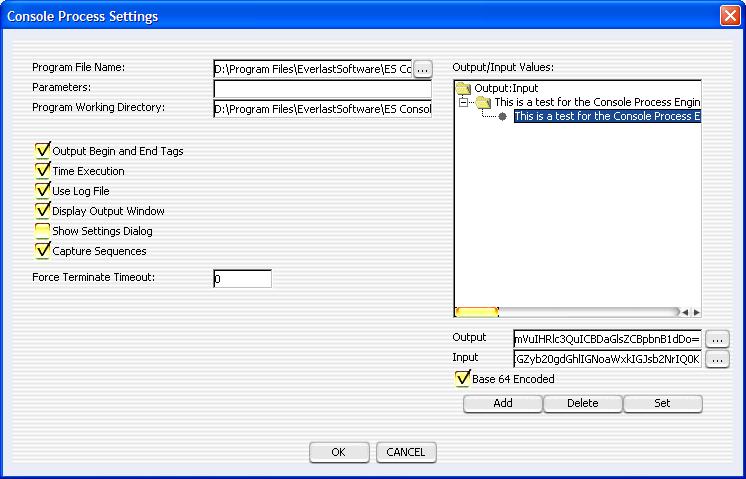
configured to download XML from a remote server. There is also a graphical user interface (preferred) for
configuring the engine. The picture below demonstrates the GUI.
|
USES
Since the engine is capable of executing any console type program that flushes streams properly, the realm of usage
is quite large. Whether it is used to simply execute a legacy compression program, secure copy program, or cd burning software,
the ES Console Process Engine will monitor and control with the supplied parameters. This means there is no requirement
for coding of any kind. It allows businesses to continue to fully utilize legacy console applications as well as
continue to develop new ones. It is also perfect for batching console applications which would typically involve user
intervention. It is also very useful for logging/processing hidden standard output or standard error messages that are generated inside DLL's or libraries. These messages are often lost when executing any type of graphical application (like a traditional Windows application that utilizes DLL's).
EXAMPLES
Linux (Fedora Red Hat)
The following link contains example screenshots of the ES Console Process Engine in action. The specific example shows the engine executing 'bash' and doing an 'ls -l' inside. Any console program can be executed, but this specific example was chosen to demonstrate how the user can still interact with the engine while it does its normal logging and input feeding and output parsing.
Usage Example of the ES Console Process Engine (Linux)
PLATFORM SPECIFICATIONS
Supported Operating Systems With Installer: Windows 98, ME, NT, 2000, 2003, and XP.
Unofficially Supported Operating Systems Without Installer (ZIP file): Any operating system with Java 1.4+. This includes Linux, AIX, Solaris, etc. It was tested with Fedora Code 4 (Red Hat Linux) in headless mode and graphical mode and showed no issues when Java 1.5.0_06 was installed (1.4.2 that came with Red Hat has major issues). It was tested and fully functional on Mac OS X (10.3) as well.
ES Console Process Engine requires Java to be used. Any compatible JRE (Java Runtime Environment)
of version 1.4 or greater may be used, but the installer defaults to installing the 1.5.0_06 JRE.
HOME PRICING
Order Home License - $29
BUSINESS PRICING
Order Seat License(s) - $39 each
SOURCECODE PRICING
The full sourcecode to the ES Console Process Engine, as well as all other products, may be purchased from Everlast Software. For pricing or more information, please contact us.
MANUALS
User Manual
VERSION CHANGES
1.2.4 to 1.2.5
--------------
1) Created new installer to support Windows Vista and Windows 7.
1.2.3 to 1.2.4
--------------
1) Bug fixes and performance enhancements.
1.2.2 to 1.2.3
--------------
1) Bug fixes, including one that caused program parameters to not save properly through the settings dialog.
1.2.1 to 1.2.2
--------------
1) Updated program icons.
2) Updated the user manual.
3) Fixed bugs, including one with the installer for Windows 98, ME, and NT.
1.2.0 to 1.2.1
--------------
1) Added special string tags to read environment variables and other special strings.
2) Added the 'Capture Sequences' check box to the settings dialog to enable/disable automatic capturing of user input.
3) Updated the user manual.
4) Fixed several bugs.
1.1.0 to 1.2.0
--------------
1) Added automatic recording/capturing of input/output values for a console program.
2) Added a GUI launcher for creating and selecting multiple console program configurations.
3) Made enabled execution times and exit code appear in the display output window for the console program.
4) The universal version (ZIP file) can now be executed on non Windows operating systems by running the 'es_console_process_engine.jar' file.
1.0.0 to 1.1.0
--------------
1) Added a graphic user interface for configuring settings (XML configuring is still an option).
2) Improved exception handling.
3) Fixed various minor bugs.
4) Made demo expiration more friendly.
CONTACT
For any questions regarding pricing, additional options, development, sourcecode, or custom integration, please contact info@everlastsoftware.com. We are
very flexible and will work hard to meet your needs.
|
| | |